
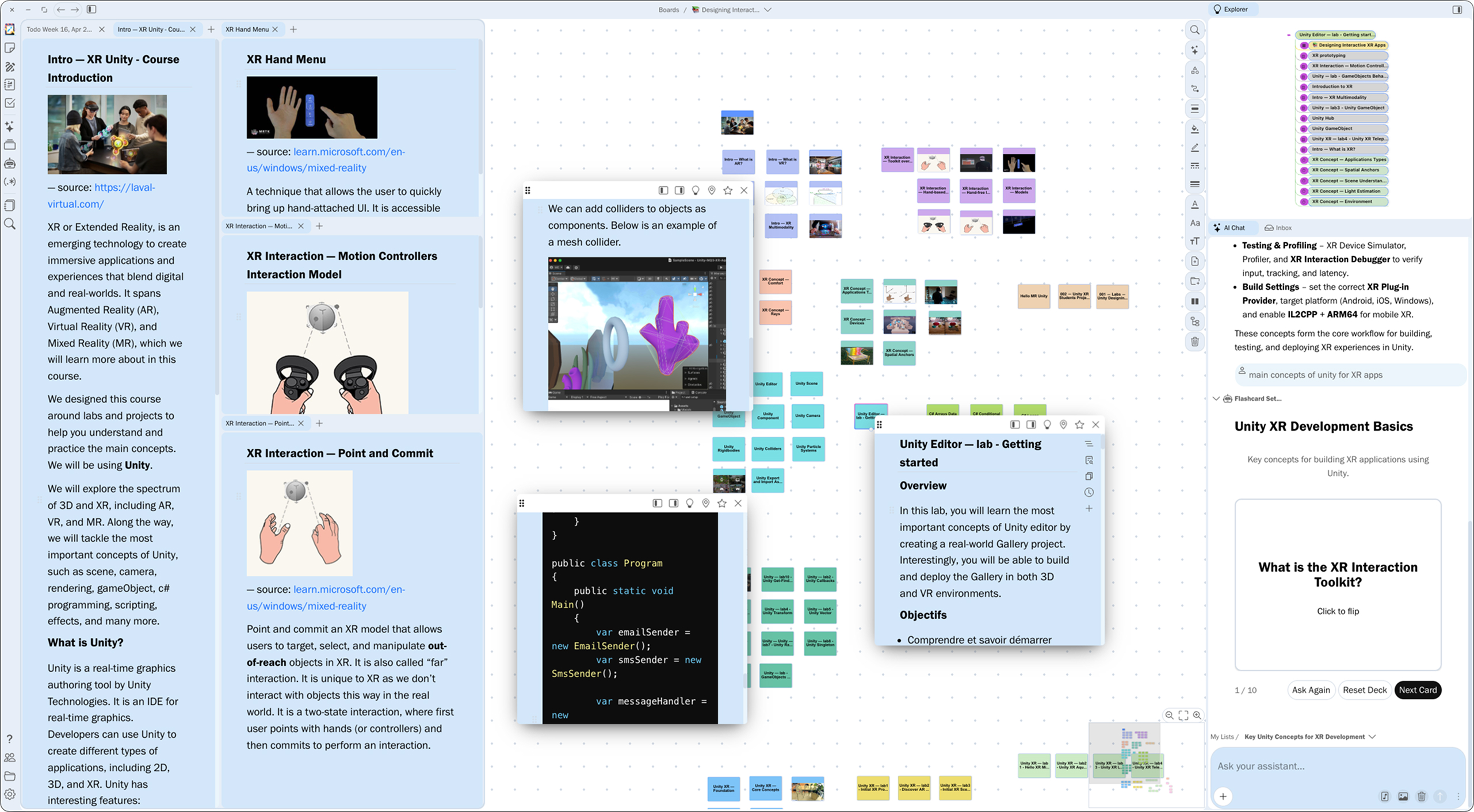
An infinite canvas for infinite ideas
Break free from the constraints of linear documents. Pinfig gives you an unlimited workspace where you can scatter notes, arrange images, connect concepts, and see the big picture—all at once.Infinite Space
Never run out of room. Zoom from a single word to a complete project.Freeform Layout
Drag, drop, and arrange anything anywhere. Your canvas, your rules.Infinite Zoom
Seamlessly zoom from overview to detail. Context always preserved.Smart Grouping
Organize with frames, sections, and nested structures.Think the way you think
Pinfig adapts to your cognitive style. Whether you're a visual thinker, a list-maker, or a network mapper, there's a mode for you.Associative Thinking
Connect ideas freely. Create links between any concepts and discover new relationships.Hierarchical Thinking
Organize with nested structures. Trees, outlines, and nested boards for structured knowledge.Visual Transformation
Switch views instantly. See your data as a graph, tree, list, or board—whatever fits your thinking.Spatial Thinking
Use space to convey meaning. Proximity, grouping, and layout become part of your expression.Supercharge with AIAI that knows
Pinfig's AI runs locally on your device, reading and understanding your notes to give you answers grounded in your own knowledge. No data leaves your machine.
AI that knows
your context
Pinfig's AI runs locally on your device, reading and understanding your notes to give you answers grounded in your own knowledge. No data leaves your machine.Pinfig AI
Local model · Ready
What are the key concepts in my research notes?
Based on your knowledge base, here are the main themes:
Cognitive Load Theory
Neural Network Architectures
Natural Language Processing
Sources: 3 documents · 12 notes
Ask anything about your notes...
Your intelligent companion
Have natural conversations with your knowledge base. Ask questions, get insights, and discover connections across all your notes and documents.Interactive widgets
Documents synthesis
Conversation history
AI AgentsDelegate your tasks
🔍
Research Assistant12 tasks completed✏️
Writing Editor8 tasks completed📊
Data Analyst5 tasks completed📋
Content Planner6 tasks completedPersonalized AI at your service
Create specialized AI agents tailored to your needs. From research assistants to writing editors, build your own team of digital experts.Custom agent creation
Specialized knowledge
Task automation
AI WorkflowsAutomate your content
3 active
Weekly Newsletter
Processing
2/3 stepsCourse Notes Summary
Done
3/3 stepsProject Specs Review
Queued
0/3 stepsAutomate with intelligent workflows
Build powerful AI workflows that process, analyze, and transform your content automatically.Visual workflow editor
Structured artifacts
Document processing
AI ToolsTransform your content
Flashcards
FAQ
Quiz
Podcast
Diagram
Code
More tools
AI-powered interactive tools
Transform your notes into engaging formats instantly. Create flashcards, quizzes, podcasts, diagrams, and more with a single click.Flashcard, FAQ, Quiz generation
Diagram generation
Podcast creation
Write without friction
A distraction-free editor that supports everything you need—from quick notes to complex documents.Markdown Native
Write in Markdown with live preview. Your content stays portable.Slash Commands
Type / to insert anything—headings, lists, code blocks, or even custom widgets.Block-Based
Every paragraph is a block. Drag to reorder, duplicate, or move between notes effortlessly.Embed Anything
Images, audios, code snippets—embed it all inline with your text.Collaboration
Work together, privately
Real-time collaboration, built with privacy in mind. Your data stays on your device.Real-time CollaborationCo-edit notes with your team in real-time.
Privacy FirstYour data stays on your device.
Granular PermissionsShare individual boards.
Presence IndicatorsSee who's online and what they're working on.
Built-in ToolsEverything you need,
Replace scattered tools with native features built right into your workspace. Organize, sketch, and present without context switching.
Everything you need,
nothing you don't
Replace scattered tools with native features built right into your workspace. Organize, sketch, and present without context switching.Organize with clarity
Manage tasks with flexible lists and Kanban boards. Drag and drop to prioritize, track progress, and keep your projects moving forward.Multiple views
Drag & drop
Due dates & priorities
Multi-project tasks
Free Form Sketching
Create beautiful diagrams, flowcharts, and sketches with a powerful drawing canvas, integrated directly into your workspace.Freehand drawing
Diagrams, flowcharts, and more
Export to PNG/SVG
From Notes to Slideshow
Turn your boards into presentations. Present directly from Pinfig or export to share. Perfect for meetings, lectures, and demos.One-click presentation
Rich notes slides
Embed images and PDFs