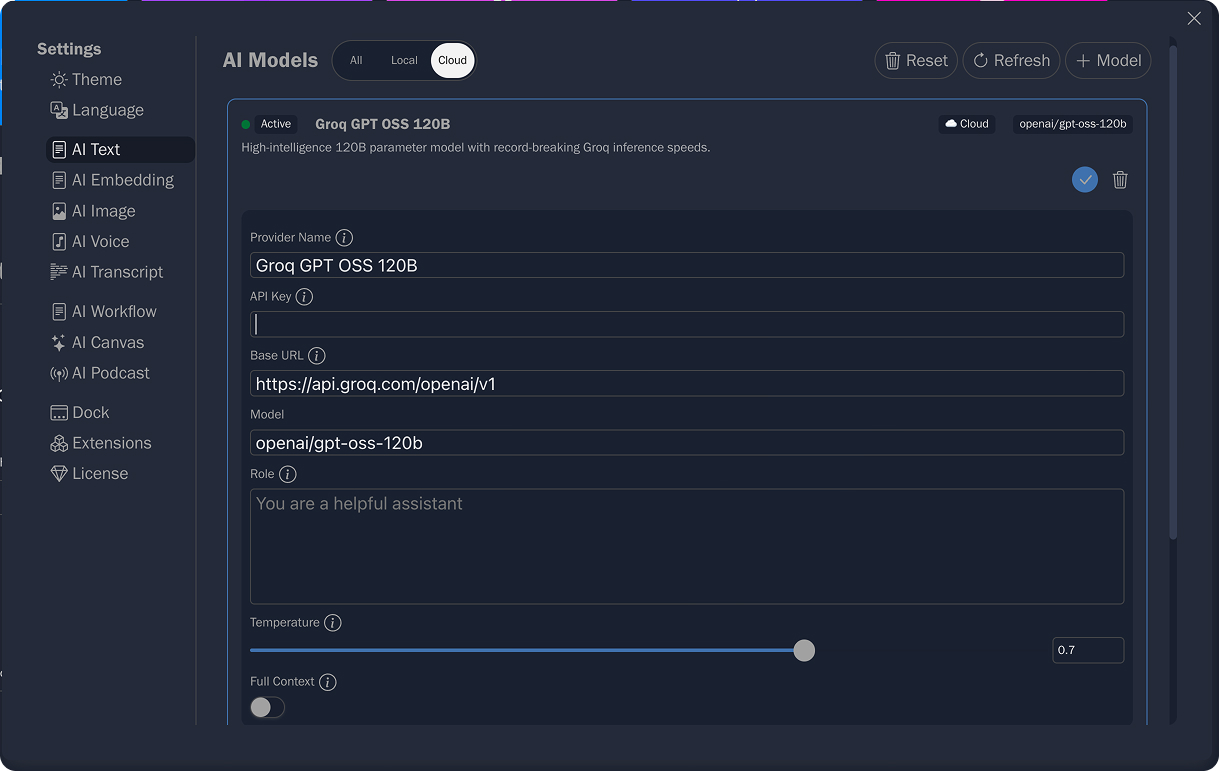
Pinfig uses a "Bring Your Own Key" (BYOK) approach, giving you full control over which AI models you use and how much you spend.
Supported Providers
You can connect Pinfig to any OpenAI-compatible AI providers, like Chatgpt, Groq, etc.
Configuration Steps
1
Open App Settings
2
Select the AI capability you want to configure (Text, Image, Audio, etc.).
3
Click on the Add Model button
4
Enter your API Key.
5
Provide a Base URL if you are using a provider other than OpenAI (e.g., https://api.groq.com/openai/v1).
6
Specify the Model name (e.g., openai/gpt-oss-20b).
7
You can customize settings like role and temperature to control the creativity of the responses.
By default, Pinfig uses sampling to optimize token usage while keeping chat history enabled. Unless you specifically need it, you do not need to enable Full context.